Notifications ,Campaigns and Letters: New Commission Disbursement Authorization (CDA) merge field
Overview
The CDA breakdown merge field was introduced to support new customers. It provides a simplified and tailored breakdown of payments.
This enhancement ensures agents and vendors see only the payments that apply to them, improving clarity and reducing confusion in CDA emails.
Data Display Rules
The merge field will output the following:
Agent(s): Only agents who are due payment.
Third party payment renamed on the CDA as Contribution to closing cost (if any)
Vendor Payments: Any payments to vendors in the extra voucher, excluding EPAY.
Company Payment
Referral payment (if any)
Special Scenarios / Exceptions
EPAY extra voucher → Must not appear in the email.
Font consistency → Output must match the font selected by the user in the email template.
Company amount → Must equal the Invoice Total from the Post screen in the Properties menu.
Agent representing both sides.
Show the TOTAL combined amount.
Agent should appear only once.
This is available in:
Letters
Notifications
Campaigns
We’re excited to introduce an improved CDA Breakdown merge field designed to make your commission disbursement authorizations clearer and more accurate.
With this enhancement, you will:
- See only the agent(s) who are scheduled to be paid — even when an agent represents both list and sell sides
- Eliminate blank or unnecessary details in the breakdown
- Enjoy a cleaner, more streamlined payment view tailored to your workflow
- Keep accounting information concise and relevant
This update helps ensure your CDA documents are easier to review, more professional, and aligned with real-world transaction scenarios.
The merge field should display the following payment details:
Agent(s)
- list/sell agent.
- if the agent is representing both side the amount should be the “total amount” to be paid to the said agent.
Any payments to vendors/agents in the other payouts (3rd party payment)
- The name displayed for this should be - “Contributions to closing cost (if any)”.
- It should display the name of the payee and the amount to be paid.
Any payments to vendors in the extra voucher (excluding EPay), specifically:
- Alpha Commercial
- Bizzy Coaching
- Texas Referral Partners (if applicable)
Payment to the company- amount is taken from the invoice total in Properties>Post
Total Amount - total payment from the agent up to the payment to the company
Below is a screenshot of the sample:
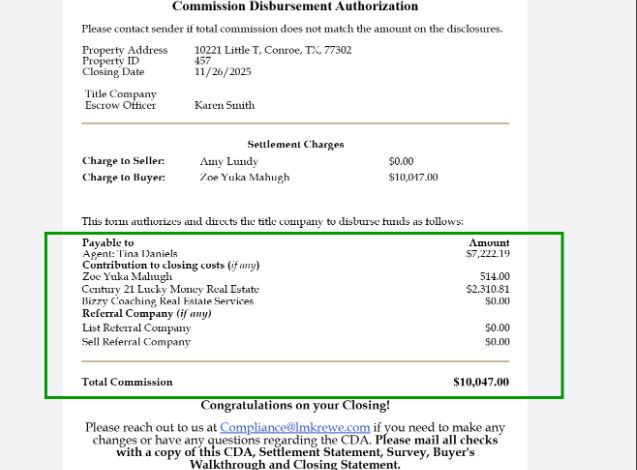
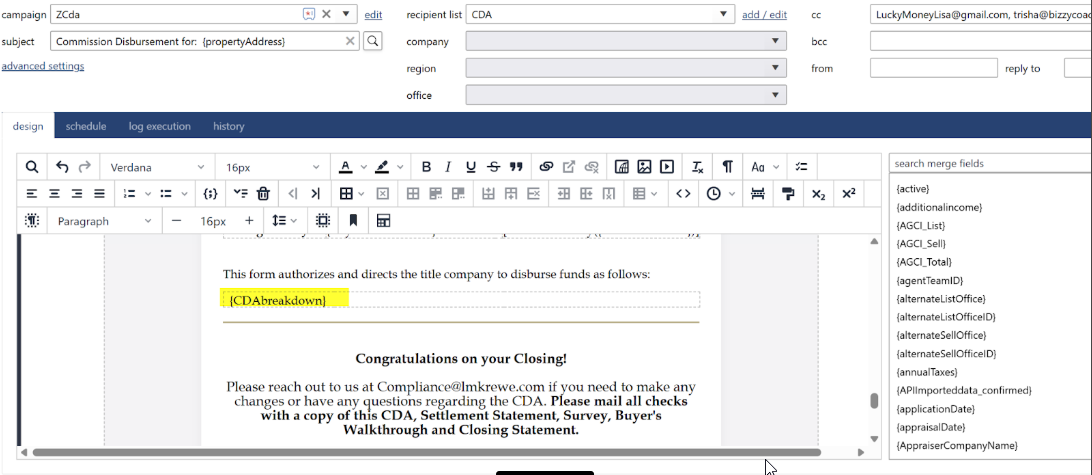
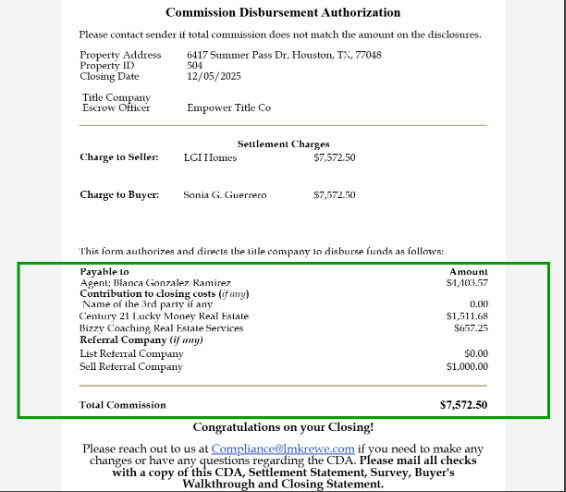
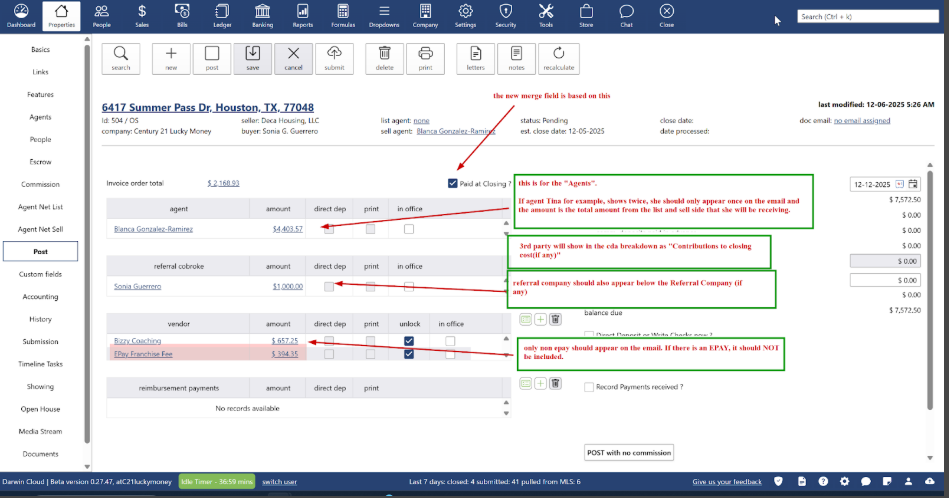
Special scenarios or exceptions that both the development and support teams should be aware of.
EPAY Extra Voucher- Must NOT appear in the email output. Other extra vouchers to be paid to other vendor should appear.
Font Consistency- The font of the merge field should match the font selected by the user in their email template.
Company Amount- The company amount displayed should be the value shown in the Invoice Total field of the Post screen in the Properties menu.
If the same agent represents both listing and selling sides:
The amount should display the TOTAL combined amount.
The agent should only appear once in the breakdown.
Third party payment needs to be named as: Contribution to closing cost
If payment to the 3rd party company/payee comes from 2 agents, the TOTAL AMOUNT should be displayed
New merge field should be based on the “paid at closing”.