Overview
A new system notification has been introduced to alert administrators whenever an agent or supplier adds or updates their payment information. This enhancement strengthens financial oversight, improves audit tracking, and ensures that all ACH and credit-card changes are captured in real time.
The notification is already included in the master template and supports up to five payment-method slots for both ACH and CC.
Notification Names
Each payment slot has its own dedicated notification following this naming convention:
| Notification Name |
| Admin Notification – Payment Method Added/Updated (ACH1/CC1) |
| Admin Notification – Payment Method Added/Updated (ACH2/CC2) |
| Admin Notification – Payment Method Added/Updated (ACH3/CC3) |
| Admin Notification – Payment Method Added/Updated (ACH4/CC4) |
| Admin Notification – Payment Method Added/Updated (ACH5/CC5) |
This naming convention aligns with the existing merge-field structure and makes it easy for administrators to identify which payment method triggered the alert.
When the Notification Is Triggered
The notification fires automatically when either of the following events occurs:
- A new ACH or credit-card payment method is created
- An existing payment method is modified — including changes to labels, account types, routing numbers, expiration dates, or other details
This ensures administrators have immediate visibility into sensitive financial updates and can verify accuracy before any payouts or charges occur.
Benefits to Administrators and Accounting Teams
- Enhanced audit trail documenting each payment-method change with timestamps
- Reduced payment errors by allowing admins to confirm the correct account or card was added
- Improved compliance through masked account numbers and structured data fields
- Operational efficiency by eliminating guesswork and reducing support inquiries related to payment updates
Merge Fields Reference
Each notification uses dynamic merge fields to populate the specific payment details that were added or updated. The table below shows all available fields side by side for ACH and Credit Card. Replace # with the slot number (1–5).
| ACH Fields (ACH1–ACH5) | Credit Card Fields (CC1–CC5) |
| {PayMethod ACH# - modified date} | {PayMethod CC# - card type} |
| {PayMethod ACH# - account holder} | {PayMethod CC# - created date} |
| {PayMethod ACH# - account label} | {PayMethod CC# - expire month} |
| {PayMethod ACH# - account type} | {PayMethod CC# - expire year} |
| {PayMethod ACH# - created date} | {PayMethod CC# - last 4 digits} |
| {PayMethod ACH# - mask account number} | {PayMethod CC# - modified date} |
| {PayMethod ACH# - paymentMethodType} | {PayMethod CC# - name on} |
| {PayMethod ACH# - routing number} | {PayMethod CC# - payment label} |
| {PayMethod CC# - paymentMethodType} |
ACH Merge Fields — Detailed Reference
Each ACH payment slot (ACH1 through ACH5) exposes the following merge fields. Replace ACH# with the appropriate slot number in your template.
ACH1
| {PayMethod ACH1 - modified date} |
| {PayMethod ACH1 - account holder} |
| {PayMethod ACH1 - account label} |
| {PayMethod ACH1 - account type} |
| {PayMethod ACH1 - created date} |
| {PayMethod ACH1 - mask account number} |
| {PayMethod ACH1 - paymentMethodType} |
| {PayMethod ACH1 - routing number} |
ACH2
| {PayMethod ACH2 - modified date} |
| {PayMethod ACH2 - account holder} |
| {PayMethod ACH2 - account label} |
| {PayMethod ACH2 - account type} |
| {PayMethod ACH2 - created date} |
| {PayMethod ACH2 - mask account number} |
| {PayMethod ACH2 - paymentMethodType} |
| {PayMethod ACH2 - routing number} |
ACH3
| {PayMethod ACH3 - modified date} |
| {PayMethod ACH3 - account holder} |
| {PayMethod ACH3 - account label} |
| {PayMethod ACH3 - account type} |
| {PayMethod ACH3 - created date} |
| {PayMethod ACH3 - mask account number} |
| {PayMethod ACH3 - paymentMethodType} |
| {PayMethod ACH3 - routing number} |
ACH4
| {PayMethod ACH4 - modified date} |
| {PayMethod ACH4 - account holder} |
| {PayMethod ACH4 - account label} |
| {PayMethod ACH4 - account type} |
| {PayMethod ACH4 - created date} |
| {PayMethod ACH4 - mask account number} |
| {PayMethod ACH4 - paymentMethodType} |
| {PayMethod ACH4 - routing number} |
ACH5
| {PayMethod ACH5 - modified date} |
| {PayMethod ACH5 - account holder} |
| {PayMethod ACH5 - account label} |
| {PayMethod ACH5 - account type} |
| {PayMethod ACH5 - created date} |
| {PayMethod ACH5 - mask account number} |
| {PayMethod ACH5 - paymentMethodType} |
| {PayMethod ACH5 - routing number} |
Credit Card Merge Fields — Detailed Reference
Each credit-card payment slot (CC1 through CC5) exposes the following merge fields. Replace CC# with the appropriate slot number in your template.
CC1
| {PayMethod CC1 - card type} |
| {PayMethod CC1 - created date} |
| {PayMethod CC1 - expire month} |
| {PayMethod CC1 - expire year} |
| {PayMethod CC1 - last 4 digits} |
| {PayMethod CC1 - modified date} |
| {PayMethod CC1 - name on} |
| {PayMethod CC1 - payment label} |
| {PayMethod CC1 - paymentMethodType} |
CC2
| {PayMethod CC2 - card type} |
| {PayMethod CC2 - created date} |
| {PayMethod CC2 - expire month} |
| {PayMethod CC2 - expire year} |
| {PayMethod CC2 - last 4 digits} |
| {PayMethod CC2 - modified date} |
| {PayMethod CC2 - name on} |
| {PayMethod CC2 - payment label} |
| {PayMethod CC2 - paymentMethodType} |
CC3
| {PayMethod CC3 - card type} |
| {PayMethod CC3 - created date} |
| {PayMethod CC3 - expire month} |
| {PayMethod CC3 - expire year} |
| {PayMethod CC3 - last 4 digits} |
| {PayMethod CC3 - modified date} |
| {PayMethod CC3 - name on} |
| {PayMethod CC3 - payment label} |
| {PayMethod CC3 - paymentMethodType} |
CC4
| {PayMethod CC4 - card type} |
| {PayMethod CC4 - created date} |
| {PayMethod CC4 - expire month} |
| {PayMethod CC4 - expire year} |
| {PayMethod CC4 - last 4 digits} |
| {PayMethod CC4 - modified date} |
| {PayMethod CC4 - name on} |
| {PayMethod CC4 - payment label} |
| {PayMethod CC4 - paymentMethodType} |
CC5
| {PayMethod CC5 - card type} |
| {PayMethod CC5 - created date} |
| {PayMethod CC5 - expire month} |
| {PayMethod CC5 - expire year} |
| {PayMethod CC5 - last 4 digits} |
| {PayMethod CC5 - modified date} |
| {PayMethod CC5 - name on} |
| {PayMethod CC5 - payment label} |
| {PayMethod CC5 - paymentMethodType} |
Notification Behavior
- Only the payment method that was added or updated is included in the email
- Both created date and modified date timestamps are displayed to show the full timeline of the change
- Sensitive data such as account numbers and card numbers are masked for security
- The notification is fully compatible with the existing master template and branding standards
- Supports up to five simultaneous ACH and five credit-card payment methods per account
Sample Email
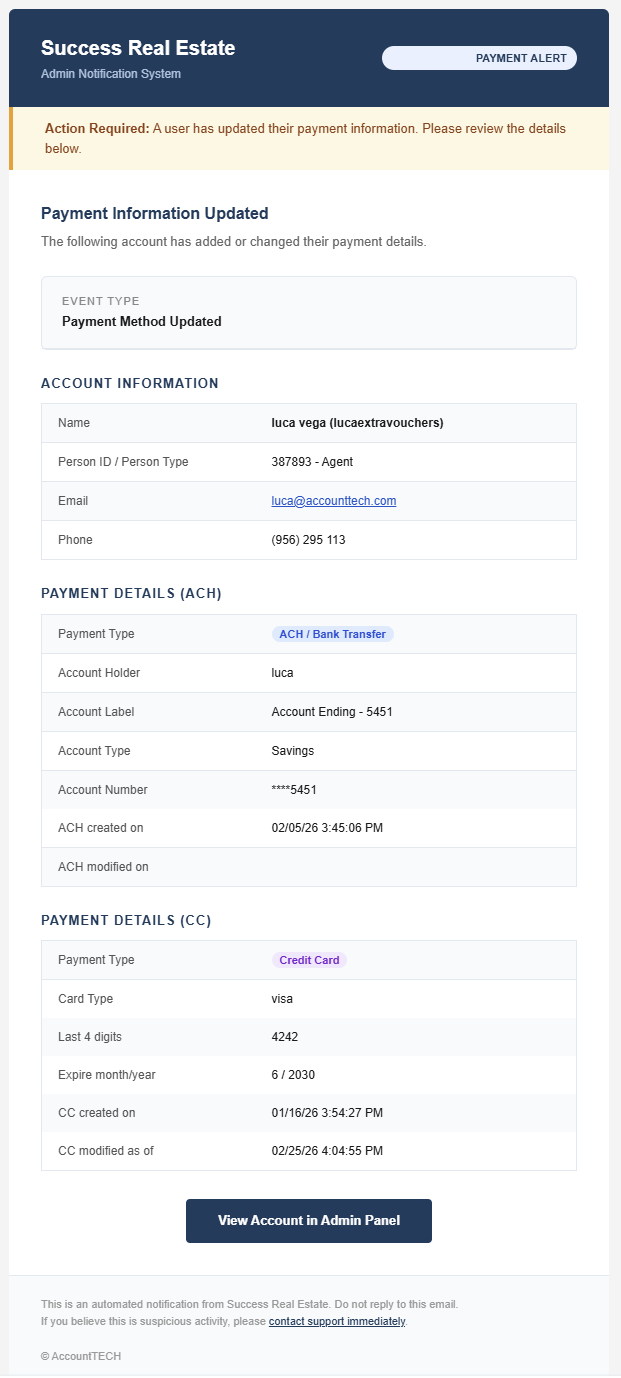
Admin Notifications Module • Payment Method Added/Updated • ACH & CC Slots 1–5