Overview
This configuration determines whether users have the authority to "unpost" a closing transaction that contains a payment processed via the Forte payment gateway. Restricting this action helps maintain data integrity and prevents unintended financial discrepancies.
Security Permissions
- Modification of this setting is restricted.
- Only users with Company Admin or Accounting Admin privileges can view or change this configuration.
Navigation
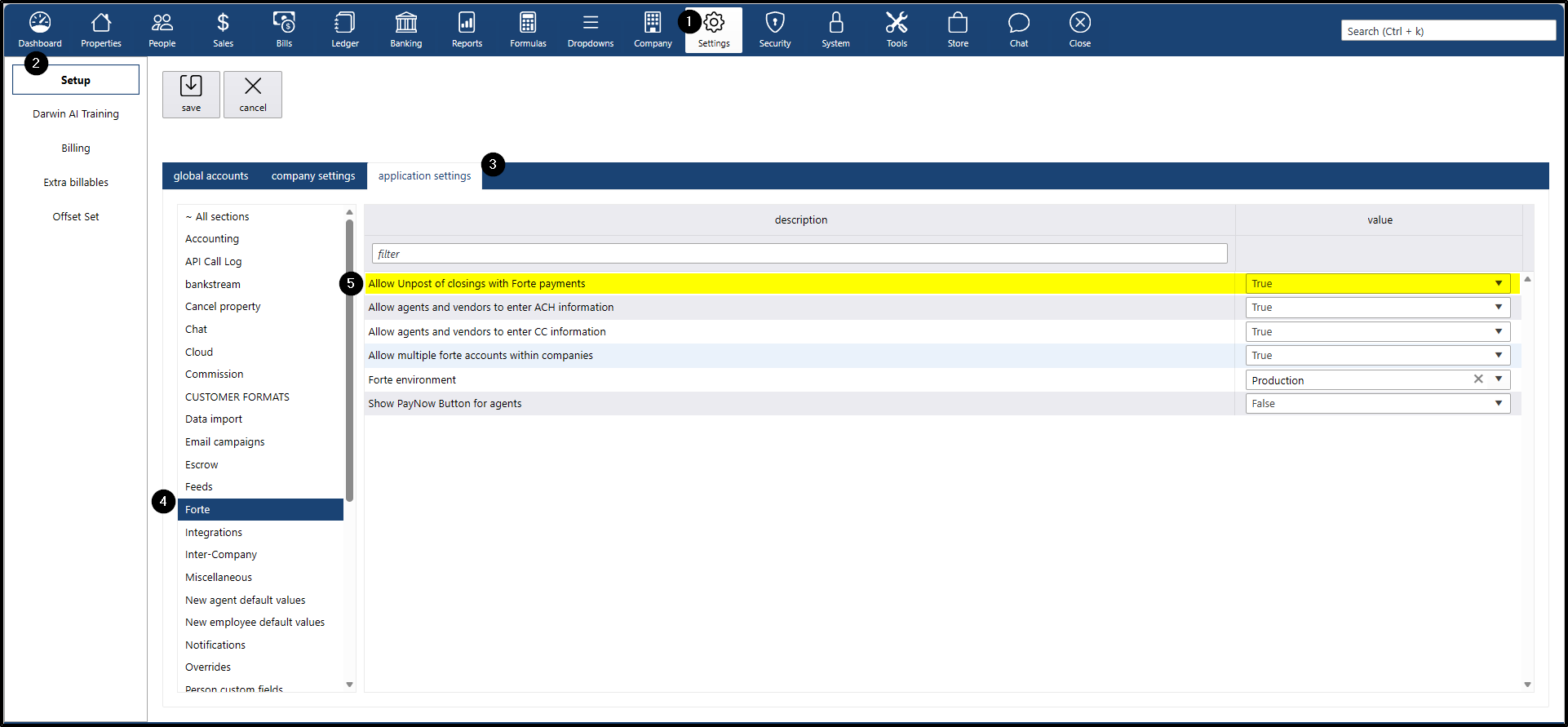
To locate this setting, navigate to:
- Settings menu
- Setup submenu
- Application settings tab
- Forte section
- Description: Allow Unpost of closings with Forte payments
Configuration Options
Setting | Result | Impact |
|---|---|---|
Enabled (Default) | Users will be able to unpost closings even if the transaction included a Forte-processed payment. | High Risk: Unposting such closings may result in duplicate payments if the transaction is reposted and paid again. |
Disabled | The system will block users from unposting any closing that includes a Forte payment. | Secure: This is the recommended setting to ensure seamless reconciliation and prevent payment duplication. |
Best Practices & Usage
- Default Configuration: Note that this setting is set to TRUE (Enabled) by default. It is highly recommended that administrators review this upon initial setup.
- Recommended Action: We suggest switching this setting to Disabled unless your internal workflow specifically requires the ability to unpost these transactions.
- Manual Oversight: Only enable this if your team is trained to manually verify and manage payment statuses within the Forte portal to avoid reconciliation errors.
- Internal Coordination: Always confirm with your Accounting or Finance team before unposting transactions with linked Forte payments to ensure no duplicate charges occur.